Slack, Teams, Linear
Reply without sounding rushed
Turn short notes into clear, respectful replies before they land wrong.
Better tone in seconds
 WhetStart using Whet
AI writing assistant for busy Mac users
Whet opens over the app you are already using. Fix grammar, make a reply warmer, polish an email, summarize notes, improve a prompt, or apply your own style without switching context.
Whet is not another blank AI chat box. It is a fast rewrite layer for the text you are already writing.
Turn short notes into clear, respectful replies before they land wrong.
Make check-ins, requests, and updates sound professional without rewriting from scratch.
Condense meeting notes, copied thread context, or rough bullets into something readable.
Improve rough prompts before sending them to the AI tools you already use.
Select text, rewrite it with Whet, then replace it back where you were working.
Save personal styles for founder updates, support replies, internal notes, or sales follow-ups.
Use it for one sentence, a long update, a support reply, or a prompt you want to make sharper before sending.
Grammar, polite, professional, summarize, expand, and prompt optimization are ready from the first launch.
Create your own rewrite styles, reorder them, and assign Cmd+1 through Cmd+0 slots.
Pro can keep a full history of requests when enabled. You can turn history off whenever you prefer.
Press the global hotkey from Slack, Mail, docs, support tools, a browser, or an AI chat.
Work with text you provide, then copy the result or replace the selected text when you choose.
Copy the result, copy and reset, regenerate, or replace the selected text back in the original app.
Pro includes a full history of requests when history is enabled, so useful rewrites are easy to find again.
Whet stays compact, keyboard-friendly, and close to the text you are working on.
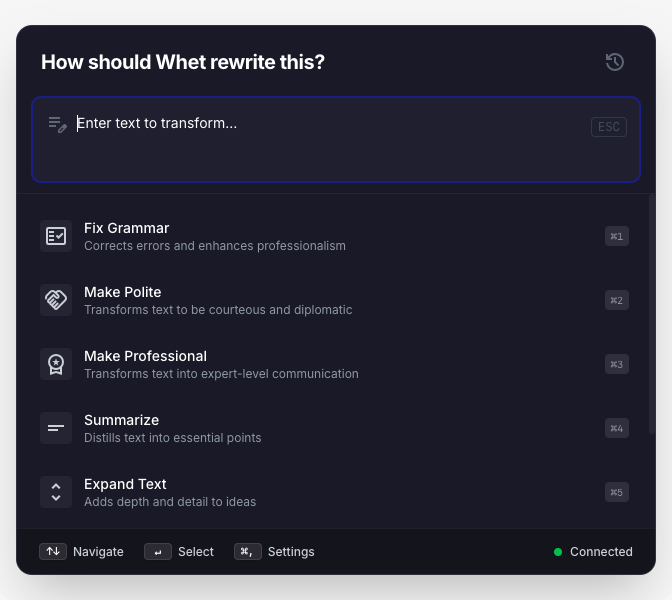
Small enough to keep you in the current task, powerful enough for everyday rewrites.
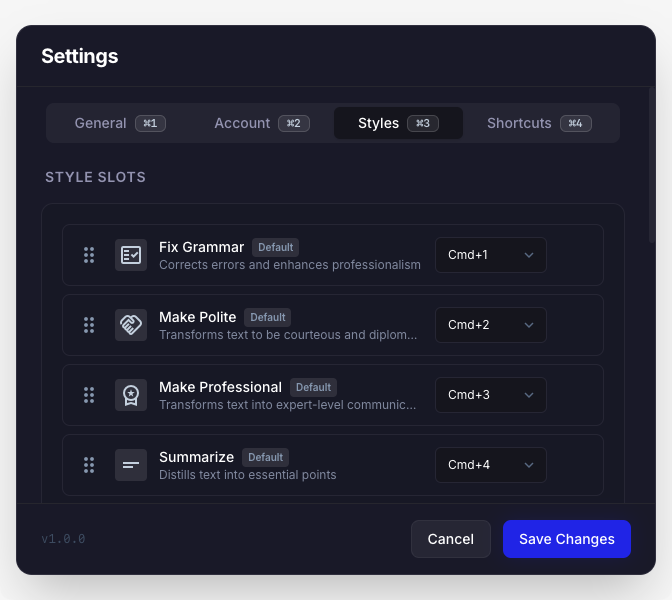
Keep frequent rewrites close with ordered slots and keyboard shortcuts.
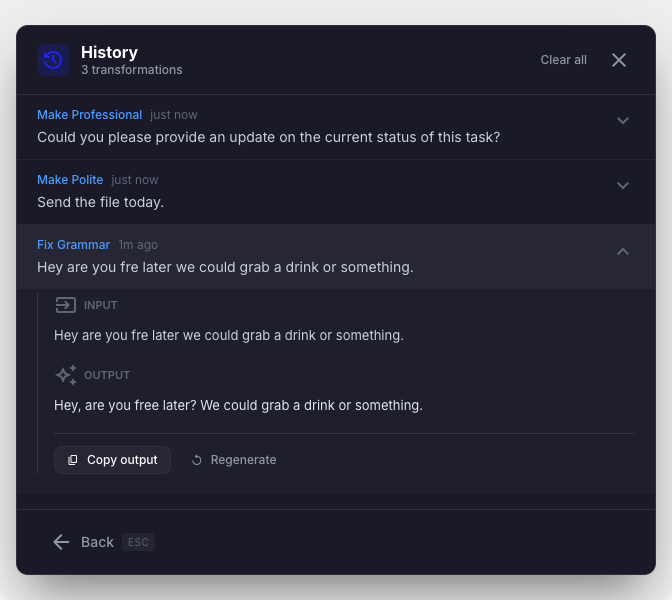
Review, copy, or regenerate useful results from your request history.
Free is enough to try the flow. Pro is for people who use Whet throughout the workday and want history plus more personal styles.
For trying Whet and occasional rewrites.
Upgrade when you want history and more styles.
For people who use Whet across Slack, email, docs, support, and AI prompts.
Payments are handled by Paddle.